








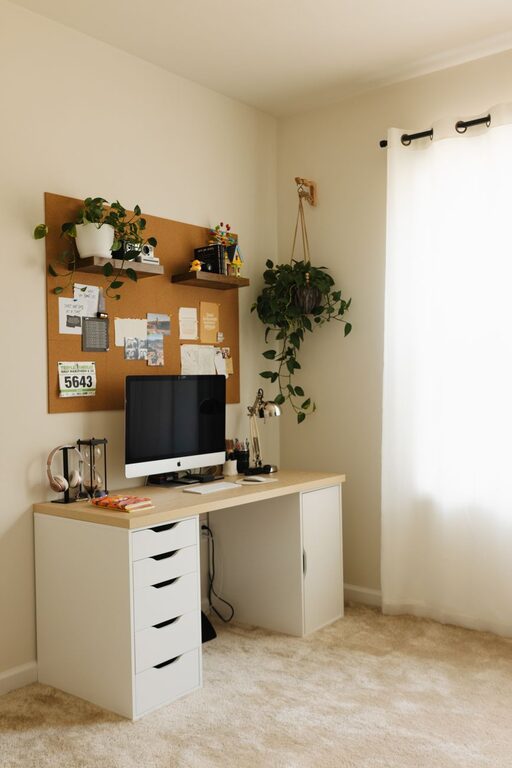
Creating a cozy and functional home office space is essential for anyone working from home or managing personal projects. A well-designed workspace can improve focus, boost creativity, and keep you motivated throughout the day. Here are practical tips to help you craft an environment that’s both inviting and efficient.
Choose the Right Location
Where you set up your home office matters. Ideally, pick a quiet corner or a room with minimal foot traffic.
– Natural Light: Position your desk near a window if possible. Natural light reduces eye strain and elevates mood.
– Away from Distractions: Avoid areas close to noisy appliances, TV, or busy living spaces to maintain concentration.
– Space Considerations: Ensure there’s enough room for your desk, chair, and storage without feeling cramped.
Invest in Comfortable and Supportive Furniture
Your comfort directly impacts your productivity and health.
– Ergonomic Chair: A chair with good lumbar support helps prevent back pain during long work hours.
– Adjustable Desk or Desk Alternatives: Consider a desk that suits your height or a standing desk option to vary your posture.
– Proper Desk Size: Choose a desk with enough surface area for your computer, documents, and any other tools you use frequently.
Organize Your Space Smartly
Keeping an orderly workspace reduces stress and saves time searching for items.
– Storage Solutions: Use shelves, drawers, or filing cabinets to keep supplies tidy.
– Cable Management: Use clips or cable boxes to prevent cords from tangling and cluttering your desk.
– Declutter Regularly: Make it a habit to clear your workspace at the end of each day.
Personalize Your Office with Cozy Touches
Adding elements that make the space comfortable can improve your mood.
– Soft Textiles: Incorporate rugs, cushions, or throws for warmth and texture.
– Plants: Indoor plants not only add color but also improve air quality and can reduce stress.
– Lighting: Use desk lamps or floor lamps with warm bulbs to create a welcoming ambiance, especially in the evening.
Create Zones for Different Tasks
If space allows, divide your office into areas dedicated to specific activities.
– Work Zone: Your desk and computer space.
– Reading/Planning Zone: A comfortable chair or small table where you can read documents or brainstorm.
– Storage Zone: Shelving or cabinets for books, files, and equipment.
This separation helps your brain switch between tasks and reduces mental fatigue.
Manage Noise Levels
Controlling noise is important for focus and comfort.
– Noise-Canceling Headphones: Great for blocking out distractions.
– Soft Furnishings: Items like curtains or carpets can help absorb sound.
– White Noise Machines or Apps: These can mask distracting background sounds.
Keep Essentials Within Reach
Think about the tools and supplies you use most and position them conveniently.
– Desk Organizers: Hold pens, notebooks, and gadgets to keep your workspace neat.
– Charging Stations: Set up a central area for charging your devices.
– Quick Access Filing: Use desktop trays for papers that need immediate attention.
Maintain Good Air Quality and Temperature
A fresh environment can keep you alert and comfortable.
– Ventilation: Open windows regularly or use fans to circulate air.
– Air Purifiers: Consider devices that improve air quality in enclosed spaces.
– Temperature Control: Use heaters or fans to maintain a consistent, comfortable temperature.
Set Boundaries for Work and Breaks
A home office can easily blur the line between work time and personal time.
– Work Hours: Define and stick to specific work hours.
– Break Area: If possible, designate a separate spot for breaks to mentally step away from work.
– Visual Cues: Closing your office door or placing a sign can signal when you are working and should not be disturbed.
Use Technology Wisely
Leverage tools and equipment that enhance your efficiency.
– Reliable Internet: A strong connection is critical for video calls and cloud access.
– Ergonomic Accessories: Keyboards, mice, or monitor stands designed with health in mind can boost comfort.
– Cable and Power Management: Use surge protectors and label cords for easy identification.
—
By following these tips, you can create a home office space that supports your needs, improves your focus, and feels like a place you want to spend time in. A thoughtful balance of comfort and functionality makes working from home a more pleasant and productive experience.